發表文章

目前顯示的是有「Visual Studio」標籤的文章

Visual Studio 開啟方法內嵌參數提示

圖片
 Visual Studio 開啟方法內嵌參數提示

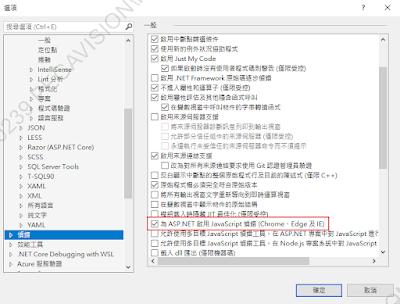
Visual Studio ASP.Net 一直中斷在Javascript位置

圖片
 關閉[工具>選項>偵錯]的下面設定, 停用Javascript偵錯就不會一直中斷在Javascript了。

Visual Studio 快捷鍵

  #region ... #endregion 001. Ctrl + K, Ctrl + S 將選取程式碼前後加上 #region ... #endregion 002. Ctrl + M + M 折疊當前 region 003. Ctrl + Shift + ↑ or ↓ 切換當前region至 #region or #endregion 004. Shift + F12 尋找所有參考 005. F12 移至定義 005-2. Ctrl + F12 移至實作 006. Ctrl + (減字號) 返回前一步驟 007. Ctrl + D 複製當前列資料 008. Ctrl + X 刪除當前列資料

Visual Studio 好用的延伸模組(vsix)

Codinion 文字顏色管理 Better Comments 註解顏色管理

怎麼停用Win10縮放比例造成WinForm尺寸跑掉問題

圖片
 因為現在螢幕解析度越來越高, 若在筆電上使用Win10系統時, 字會變很小, 所以通常都會放大125%~150%, 這會導致使用Visual Studio開啟Winform專案時, 物件尺寸會跑掉。 解決方法可以直接接外接螢幕, 調回100%, 就不會影響到Winform物件尺寸, 但也可以透過下面修改, 直接停用Visual Studio的DPI感知設定, 1. 開啟登錄(regedit) 2. 在[HKEY_CURRENT_USER\SOFTWARE\Microsoft\Windows NT\CurrentVersion\AppCompatFlags]新增機碼[Layers] 3. 在Layers下新增子機碼 a. 名稱: VS程式路徑 b. 類型: REG_SZ c. 資料(值): DPIUNAWARE 4. 再開啟Winform視窗時, 就會顯示[自動縮放比例已關閉] 各版本VS程式路徑: C:\Program Files (x86)\Microsoft Visual Studio\2017\Community\Common7\IDE\devenv.exe C:\Program Files (x86)\Microsoft Visual Studio\2019\Community\Common7\IDE\devenv.exe C:\Program Files\Microsoft Visual Studio\2022\Community\Common7\IDE\devenv.exe ref web: https://docs.microsoft.com/zh-tw/visualstudio/designers/disable-dpi-awareness?view=vs-2022#add-a-registry-entry

VS2010開發小技巧

多行編輯:alt+shift+滑鼠 檢視定義後,回到原來位置:ctrl + 減號 Reference Web: http://blog.miniasp.com/post/2011/03/29/Visual-Studio-2010-Tips-Part-01.aspx

下載Visual Studio Express離線安裝檔方法

下載Visual Studio Express離線安裝檔方法 先下載線上安裝檔後, 執行時增加"/layout"參數即可。 reference web: https://msdn.microsoft.com/library/e2h7fzkw(v=vs.140).aspx#BKMK_Offline

[Visual Studio]Web Service 與 WCF 差異表筆記

差異表 NO 功能 Web Service WCF (原名  Indigo)   .NET Farmework .NET 1.1 以上 .NET 3.5 以上   Hosting 可建置於 IIS 可建置於 IIS, Windows Activation Service, Self-hosting, Windows Service   Programming 定義 [WebService] Attribute 於類別 定義 [ServiceContract] Attribute 於類別   Model 使用 [WebMethod] Attribute 公開可見的方法 使用 [OperationContract] Attribute 公開可見的方法   Operation One-Way, Request - Response 於 Web Service 中支援各種操作 One-Way, Request - Response, Duplex 於 WCF 中支援不同類型的操作   XML 使用 System.Xml.Seriallzation 命名空間進行序列化 使用 System.Runtime.Serialization 命名空間進行序列化   Encoding XML 1.0, MTOM(Message Transmission Optimization Mechanism), DIME, Custom XML 1.0, MTOM, Binary, Custom   Transports 透過 HTTP, TCP, Custom 溝通 透過 HTTP, TCP, Named Pipes, MSMQ, P2P, Custom 溝通   Protocols 配合 WSE 可支援 WS-*,提供安全性 支援 WS-*,提供安全性、可靠性、交易   State Management 無狀態 可管理狀態   Other   整合 Enterprise Sevices(COM+)、.Net Remoting、Web Service(ASMX)、WSE3.0 和 MSMQ reference we...